Activating and Managing Service Tariffs
Applying or Changing Tariff Plans to a User’s Profile
The service platform offers flexible options for managing user tariffs, including applying new plans or modifying existing ones. This document outlines the methods available to administrators for these tasks.
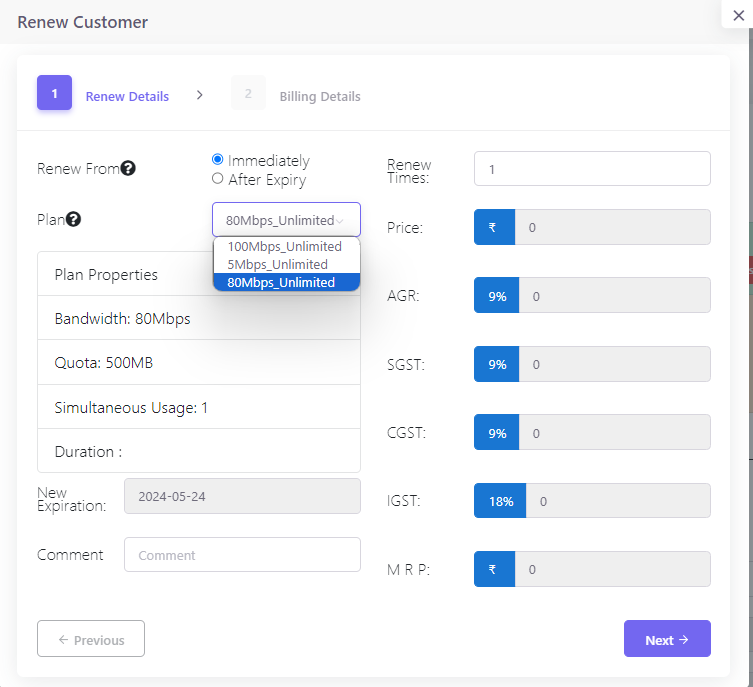
Method 1: Using the Renew Tab
To apply or change a tariff plan during the renewal process:
- Navigate to the user’s profile by selecting
Users>List Usersand clicking on the desired username. - In the user’s profile, locate the
 tab.
tab. - Select the new plan from the dropdown menu within the
Renew Detailssection. - Specify the renewal settings, such as the effective date and the plan duration.
- Review the billing details, and confirm by clicking the
Renewbutton.
Method 2: Action Dropdown Menu
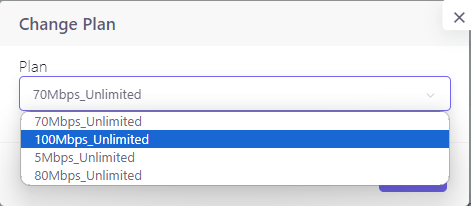
To change a plan without renewal:
- Access the user’s profile as described above.
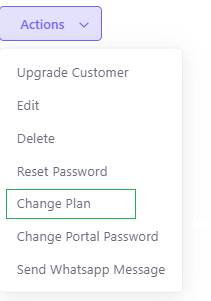
- Click on the
Actionsdropdown menu. - Select
Change Planfrom the list of available actions. - Choose the new tariff plan from the options presented and confirm the change.
Efficient Service Management
Managing service tariffs directly from the user’s profile streamlines the process, saving time and reducing errors. This direct approach ensures that the administrators can swiftly respond to user requests for service changes and maintain a high level of service quality. The simplified workflow allows for quick updates and modifications, keeping user satisfaction as a priority.
Bulk user renew
For managing multiple users at once, please checkout our Bulk User Renew page for a streamlined bulk processing approach.