Granting Grace Periods to Users
Purpose
The Grace feature is a valuable tool designed to enhance customer satisfaction by allowing administrators to extend service access beyond the original expiration date. This extension serves as a goodwill gesture in instances of service interruptions or other special circumstances that may affect the user’s ability to utilize the service fully.
Applying a Grace Period
To offer a Grace period to a user, please follow these steps:
- Navigate to
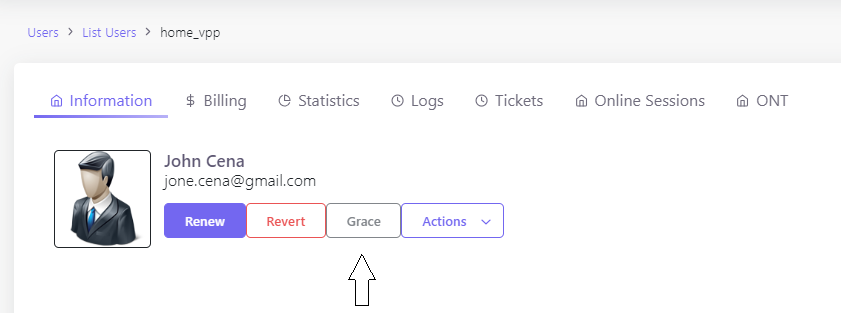
Users > List Usersand select the desired user profile. - Click on the
Gracebutton located in the user’s profile section. - In the
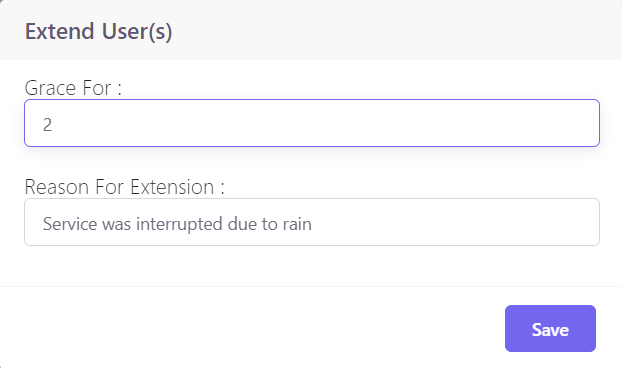
Extend User(s)dialog, enter the number of days for the extension in theGrace Forfield. - Provide a justification for the Grace period in the
Reason For Extensionbox. This helps maintain transparency and a record for future reference. - Click
Saveto apply the changes.
The system will automatically update the user’s account, extending their service access for the specified period without additional charges.
Benefits of Granting Grace
- Customer Retention: Addressing service disruptions by granting grace periods can help retain customers who might otherwise be inclined to discontinue their service.
- Goodwill: Offering grace periods can foster goodwill and strengthen the customer relationship.
- Flexibility: It provides users with additional time to arrange for renewal payments or transition between service plans.
Remember to document all instances of granted grace periods to keep a clear record for customer service follow-ups and account management.
For any questions or additional support on applying grace periods, please refer to our comprehensive help resources or contact the support team.
Return to User Profile and Management Activities | Learn about Bulk User Renewal