List Users
The ‘List Users’ section of the ISPCRM dashboard provides a detailed overview of all user accounts, their service plans, and connectivity status. It is an essential tool for monitoring and managing your subscriber base.
User List Overview
Within the user management interface, the user list displays an organized compilation of user data and service details.
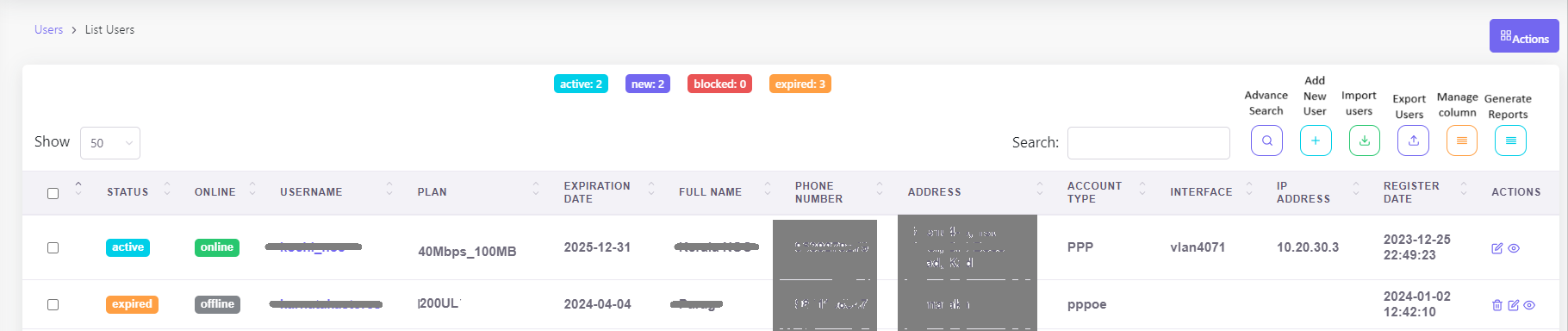
Understanding the Interface
- Status: Each user’s service state is indicated as ‘active’, ‘expired’, or ‘new’.
- Online: This shows whether a user is currently online or offline.
- Username: The unique username assigned to the user.
- Plan: Details the service plan each user is subscribed to.
- Expiration Date: The date on which the user’s current plan is set to expire.
- Full Name: The user’s full name for identification and record-keeping.
- Phone Number: Contact number linked to the user’s account for communication purposes.
- Address: The physical location details of the user.
- Account Type: Specifies the type of account, such as PPPoE or IPoE.
- Interface: The network interface used by the user, like vlan4071.
- IP Address: The specific IP address allocated to the user.
- Register Date: The date and time when the user was added to the system.
User Profile and Management Activities
For comprehensive guidance on managing user accounts, including profile edits, tariff applications, service activations, and more, visit our dedicated page: User Management Activities This resource provides a detailed walkthrough of all the tools and actions available to administrators, ensuring efficient user account management within the ISPCRM system.
Functional Tools

- Search: Quickly find a user with the search bar, enhancing user lookup efficiency.
- Add New User: Onboard new subscribers using the ‘Add New User’ button.
- Import Users: Bulk import user data with the ‘Import Users’ option.
- Export: Download user list data using the ‘Export Users’ feature.
- Manage Columns: Customize the display of user information with ‘Manage Columns’.
- Generate Reports: Create detailed reports for further analysis and decision-making.
Actions Dropdown Menu
The ‘Actions’ dropdown menu within the ISPCRM dashboard empowers you with a suite of bulk operations to efficiently manage user accounts. Here’s a rundown of the functionalities it offers:
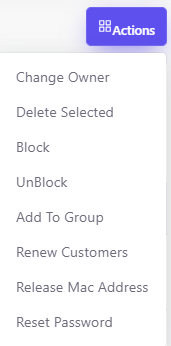
- Change Owner: Transfer ownership of selected user accounts to a different administrator or owner within your organization.
- Delete Selected: Permanently remove the selected user accounts from the system.
- Block: Restrict access for selected users, temporarily disabling their ability to use the service.
- UnBlock: Lift any restrictions previously set, reinstating user access to the service.
- Add To Group: Assign selected users to a predefined group, which can be used for segmented service plans or administrative purposes.
- Renew Customers: Process a bulk renewal of services for selected customers, ensuring continued access without interruption.
- Release Mac Address: Disassociate the selected user accounts from their current hardware MAC addresses, allowing for device changes or updates.
- Reset Password: Initiate a bulk password reset for enhanced security or to assist users in regaining access to their accounts.
Optimizing User Management
- Proactively engage with users whose plans are about to expire, and encourage plan renewals to maintain an active subscriber base.
- Regularly update user information to ensure that all records are accurate and up to date.
- Use the filter options to segment users based on status, service plans, or connectivity for targeted management.
By effectively utilizing the ‘List Users’ feature, administrators can ensure operational excellence and provide a high level of service to subscribers.