Upgrade Tariff Plan
Overview
The Upgrade Tariff Plan feature allows administrators to enhance a user’s service package to cater to evolving bandwidth needs or service preferences. This ensures users have access to the necessary resources and services they require.
Steps to Upgrade a User’s Tariff Plan
To upgrade a user’s tariff plan, follow the steps outlined below:
- Navigate to the user’s profile by selecting ‘Users’ then ‘List Users’ from the main menu.
- Click on the desired user to view their profile.
- Within the user’s profile, click on the ‘Actions’ dropdown menu.
- Select the ‘Upgrade Customer’ option.
-
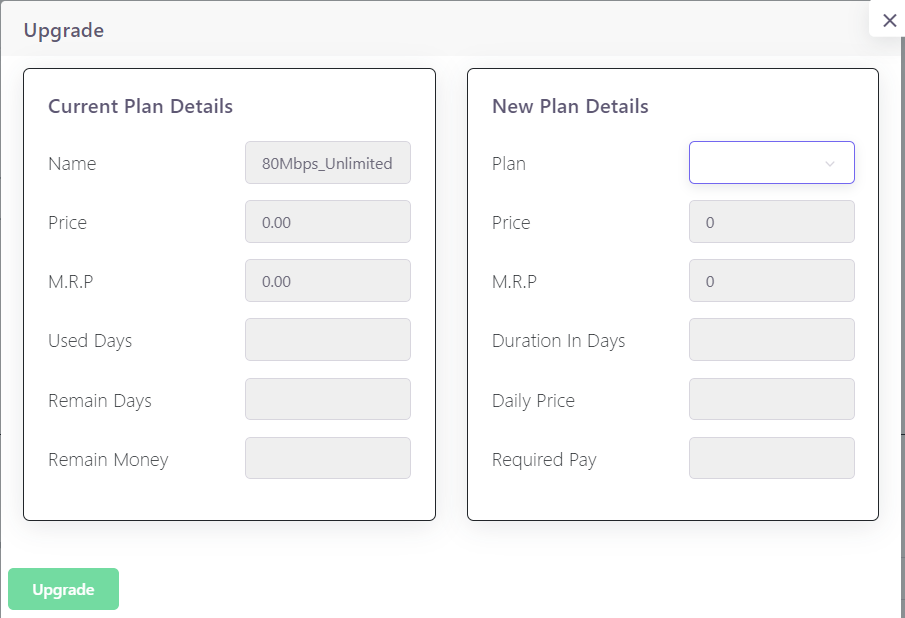
In the upgrade interface, you will see the ‘Current Plan Details’ which include:
- Price
- Name
- M.R.P.
- Used Days
- Remain Days
- Remain Money
-
On the right side, ‘New Plan Details’ will be displayed, where you can:
- Select the new plan from a dropdown menu.
- View the new plan’s price, M.R.P., duration in days, and daily price.
- Determine the required payment for the upgrade.
-
After confirming the new plan details, click on the ‘Upgrade’ button to apply the changes.
Benefits of Upgrading Tariff Plans
- Customization: Tailor services to meet the specific needs of the user.
- Scalability: Easily adjust to increased service demand.
- Satisfaction: Enhance user experience by providing timely service upgrades.
For detailed instructions, including screen captures and step-by-step processes, refer to the internal documentation or help resources available within the ISPCRM platform.